
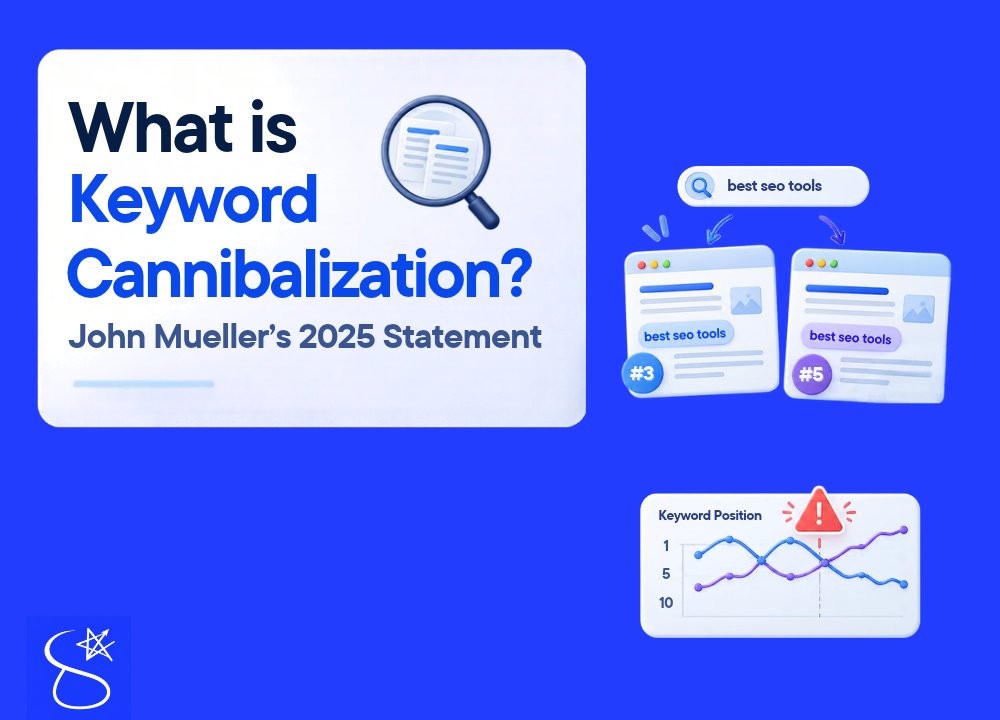
You may probably hear that keyword cannibalization means “two pages ranking for the same keywords”. Okay, maybe that’s true, but think for a while: many big sites rank for multiple broad keywords. If you check two pages on the same topic with different intent, you will find thousands of the same keywords. So it also means “keyword cannibalization”? The answer is no!!
There is a big theory behind keyword cannibalization; not every situation above means keyword cannibalization, so you need to understand it. By the end of this article, you will have a clear idea of what keyword cannibalization actually is, how to identify it correctly, and how to fix it most effectively.
What is keyword cannibalization in seo? What Does It Mean?
Let’s start with its pure definition. Basically, keyword cannibalization is an SEO issue where multiple pages on your website rank for the same keyword and the same intent. And ultimately, pages end up competing against each other instead of working together, and that competition can hurt the overall website’s ranking.
That’s the basic definition, and most beginners rely on it. They see two similar pages, assume cannibalization, and delete or merge content that was never the problem. Sometimes there may be other reasons beyond keyword cannibalization. Yes, I am talking about John Mueller’s 2025 statement, and you need to understand this statement.
John Mueller has outlined 5 reasons behind keyword cannibalization, and each reason needs a different fix; this blog covers them in more detail and in a practical way.
Example for Beginner
But first, let me give you an example of keyword cannibalization. For a while, think of your website as a company and your pages as salespeople. Here, keyword cannibalization means sending two of your own salespeople to pitch the same product to the same client. Instead of winning more business, your salespeople waste time competing against each other. They will confuse clients and split the commission.
Definition from Search Engine Perspective
From Google’s point of view, keyword cannibalization is actually an ambiguity problem. When you have three pages optimized for the same keyword, Google’s algorithm struggles to figure out which page is the authority, instead of ranking one page in a very high position (1st to 3rd). Google might get confused and rank two of your pages in much lower positions, from 12 to 15.
That’s what happened with my two gardening pages, but the problem wasn’t full keyword cannibalization; it was different, and I didn’t need to remove the whole page. Instead, I optimized my weaker page.
What Are Other Reasons Beyond Keyword Cannibalization? John Mueller’s 2025 statement
With the basic definition, you understand that two pages rank for the same keyword and the same intent. It means two pages are duplicated. Right? But John Mueller’s 2025 statement shows five other 5 reasons beyond keyword cannibalization. You can understand these reasons as other forms of keyword cannibalization.
The 5 other reasons are:
1: “The pages are too long and consequently are unfocused.”
This is the first reason John Mueller states beyond keyword cannibalization.
Both pages target different keywords with good search volume and deserve separate content, but you wrote both pages too long, and the information starts overlapping.
That’s where Google Passage Ranking (an AI-driven system) comes in and evaluates each paragraph of your content. When Google finds the same information in both Article 1 and Article 2 in detail, it gets confused and starts ranking both pages for the same keyword.
For example, there are two queries: “best running shoes” and “how to wash running shoes.” They have different intent and deserve different content: one has commercial intent and needs a product page or product review guide. In contrast, the second query is purely informational and deserves a step-by-step guide.
Now, if you write your first commercial topic too long and also add the heading “how to keep running shoes clean” and detail, which is also similar to query two, this is actually called “intent overlapping”; that’s where your two pages start ranking on the same keyword.
The goal should be to create two pieces of content with their own topic and depth, so they rank for their own keywords. When two pages are too long, confusing at the end, and overlap with each other’s information, they will obviously start ranking on the same keywords.
How to solve this first reason?
The solution is clear: write both pieces of content to cover their own topics. For the first commercial query, “best running shoes,” the content should include the product page description, reviews, and a buying guide with clear commercial intent. For the second query, “how to wash running shoes,” include a detailed step-by-step guide on how to wash running shoes and keep them clean.
Sometimes, there may be two queries with the same intent, like both have “informational intent,” and you have to keep the outline for both content very specific and just focused on the main query topic. For example, there are two queries: “south texas planting zones” and “central texas planting zones.” Now I can write one detailed piece of content by covering both topics, since both keywords have good search volume,
- I will create two separate articles, and for the South Texas planting zone query, I will make a detailed, very specific outline.
- I will add specific locations and details that fall within South Texas planting zone boundaries.
That’s how you write specific content that covers the main keyword’s overall intent without overlapping other general information.
2: The pages contain off-topic passages.
The first reason implies that a page can lose focus because it is too long; however, the second reason means that, regardless of length, you included content in its paragraphs that doesn’t align with the page’s main topics.
This happens when you have two distinct articles targeting specific keywords, but you insert sentences or paragraphs into one article that don’t belong.
Writers often do this to provide extra information to the user; however, if that additional knowledge pertains to your other article, the reader’s focus shifts from the current page’s main topic to that off-topic paragraph.
Since the topics of the two pages are completely different, including substantial information from Article 2 into Article 1, information unrelated to Article 1’s core subject, confuses Google.
Consequently, Google may start ranking both pages for the same keyword based on that off-topic content. For instance, imagine you run a technology website and are targeting two queries:
“Best laptops for students” and “How to increase laptop RAM.”
If, while discussing affordable laptops for students on the first page, you digress to explain what to check before buying and include two or three lengthy paragraphs about checking laptop RAM, both pages might end up competing for the same keyword.
For instance, you might create a small box within “Article 2” to link to “Article 1,” listing items to check and directing readers to an additional buying guide. That specific section could cause both pages to vie for the same keyword.
How to solve this second reason?
The solution here is similar to the previous one, but here is an additional tip: prioritize internal links that occur naturally, using anchor text that appears organically within the content.
However, if a natural anchor text isn’t available but the article you wish to link to is highly relevant, you can add a brief, relevant snippet of information to facilitate the link, ensuring that the added text remains strictly on-topic.
After that, you can create an anchor word and link it; this means you should not link to a completely off-topic article from within your current article.
You should stick to relevant internal linking and avoid adding off-topic content altogether. Your links and paragraphs should focus strictly on material closely related to the article’s main topic.
3: The pages are insufficiently linked internally.
Google needs internal linking to understand your website’s structure. Internal linking tells Google which page is a big guide and which is specific and part of the big guide. It also shows the relationship between two pages covering the same topic with different keywords.
Here, the problem isn’t duplication; it’s insufficient internal linking, which is the third reason John Mueller mentioned. It means your two pages with the same topic have no internal linking with each other. Here, the same topic doesn’t mean duplication; it means different keywords within the same topic.
For example, two queries are “best laptops in 2026” and “best laptops for students” now both queries are different but are coming from the same topic, that is “best laptops”. If you write content for these queries and don’t link them, Google will treat both pages as covering the same keyword and may rank them for the same term.
And if you link your specific guide “best laptops for students” in your pillar guide “laptops in 2026”, Google will clearly understand “okay this is subtopic and this is the main topic” and will rank both pages differently. Insufficient internal linking also confuses Google and can cause both pages to rank for the same keyword.
How to solve this third reason?
The solution is simple: whenever you do topical mapping of your keywords, write and publish content, and make a whole plan to link all pages to each other in this way so Google understands this is actually topical authority, this is the main pillar page, and these are subpillar and cluster pages of the main pillar page.
Overall, add relevant internal links with the right anchor text, pointing in the right direction. For example, if I have to link my specific guide “best laptops for students” in the pillar guide “best laptops in 2026,” I will do it this way;
“Since laptops for students are different, they just require simple browsing, so for them we have made a detailed guide on best laptops for students”
In the line above, I clearly mention that students need simple browsing, and that there is a detailed guide for them. This line doesn’t just guide the user; it also signals to Google that there is a specific, detailed guide for students. This shows theg the relationship between the two pages through anchor wording and internal linking.
4:The pages are thin.
In the SEO world, thin content doesn’t mean small articles; it means content that doesn’t provide value to the user, even if it’s detailed and long. That is the fourth reason your two pages rank for the same keyword.
When you write content for two different queries within the same topic, but the overall information is very thin and the second article repeats the same information as article 1, this confuses Google’s algorithm, and Google will start ranking both pages for the same keyword. Because both pages provide surface-level information and there is no clear difference in topic, Google can’t treat them as separate pages.
For instance, there are two queries: “iPhone 15 features” and “iPhone 15 reviews.” In both articles, you add surface-level information and the same details, just with different wording and perspective. Both articles target different queries, but unique data is missing, intent is not focused, and ultimately Google discovers both pages as thin content and ranks both on the same keywords.
How to solve this fourth reason?
The solution here is the same as above. Make both pieces of content very detailed and specific to the main point. Both articles should be detailed, long, and specific, with proper internal linking and topical mapping. The goal isn’t just to make content good for one reason; the goal is to make both competing articles strong across all five reasons we are discussing, so we can avoid keyword cannibalization.
5: The pages are virtually duplicates of the other pages in the group.
This means two or more pages on your website are 90 to 95% the same in topic, content, or search intent. You may keep different slug URLs, changed wording, or added images, but for Googlebot, both pages are essentially the same, with no unique or valuable information.
This fifth reason mostly occurs in commercial and local-based sites; for example, there are two commercial pages;
Page 1 is /black-leather-shoes/ and page 2 is /leather-shoes-black/. On both pages, you are selling the same product and targeting the same user intent; only the wording and URL differ. That’s called virtual duplication, and that’s why Google ranks these two duplicate pages for the same keyword.
This is the biggest issue in SEO when two pages are virtually duplicate, because it wastes Google’s server resources. Instead of ranking both pages, Google may de-rank both pages and even penalize the website.
By the way, this last fifth reason can be called “keyword cannibalization” and its solution is simple: remove one page, merge it into page 2, and apply a 301 redirect to prevent technical issues. Also follow the above guidelines!!
My Real Example and Case Study
Now I am going to share my own case study; on my gardening site, there were two pages. One was about the “planting zone of south texas” and the second was about the “planting zone of central Texas”. Both deserved separate rankings, but my South Texas page ranked for the Central Texas query because it was thin and less detailed than the Central Texas page.
That was the first reason, so I fixed it, and I will also explain how to fix it. In short, write detailed, very specific content for each query and add as much information as possible, including tables so that Google can rank it for its own queries.
Now, in my real case study, the pages weren’t duplicates; they covered different topics and keywords. Because both pages had good search volume and different user intent, I created two separate articles (South and Central Texas planting zones).
The problem wasn’t duplication or keyword cannibalization; the problem was that one piece of content was long. At the same time, the other was thin, and both overlapped some Texas locations; that’s why this happened.
Do you know the reason behind my case study? From the 5 reasons above, it’s a mix of the 1st and 4th. Yes, my one page was long and confusing, while the other was thin. So you learn that there isn’t always only one reason behind a case; there may be two, three, four, or all five at the same time. Every site has a different scenario, so consider all reasons and fix them to prevent keyword cannibalization.
How does keyword cannibalization affect seo? 5 Negative Effects
When keyword cannibalization happens on your website;
1: First of all, Google itself gets confused about which keyword to rank. Since two pages are mostly duplicates and cover the same topic, Google can’t understand which is actually the real page. In this confusion, Google can de-rank both pages, negatively affecting overall SEO rankings.
2: When your website has multiple pages with the same intent, other websites will naturally link to your different content versions; some will link the first page, and others will link the second. Since all pages have almost the same topic, Google distributes its ranking power (Link Equity) separately. This splits your backlink authority across multiple pages.
3: In the keyword cannibalization situation, Google’s algorithm starts A/B testing. In the first week, Google picks one article and shows it on the first page to see whether people like it. In the next week, Google may decide article B is better than article A and replace article A with article B. This is actually called ranking fluctuation, and ultimately it causes deranking of your pages and may also result in deindexing.
4: When Google discovers your multiple pages with the same intent, the crawl budget will be wasted because most of them are duplicates and need removal and 301 redirection. This heavily affects Google’s crawl budget, which is especially important for large sites with many other pages to crawl.
5: when there is keyword cannibalization between a blog and product page on the same keyword, and google will confuse and show your blog instead of your product page, in this way, you get a loss in your sales. Because your customer lands on your blog, they may not click through to your product page because they want to purchase something, and your product page is on the previous pages of Google due to keyword cannibalization.
Summary
Now imagine again, multiple pages of big sites are ranking for the same keyword, so we will also call them keyword cannibalization? No, it’s not keyword cannibalization; it’s healthy SEO when multiple pages start ranking for broad keywords because of high domain authority and dofollow backlinks. That’s why keyword cannibalization doesn’t always mean your pages are duplicates; there may be other reasons. All reasons affect SEO in a bad way, so understand them, identify them, and fix them. John Mueller listed 5 reasons, and I’ve explained them in more detail. Keyword cannibalization” is a catch-all label that masks the real issues, things like thin content, weak internal linking, and unfocused pages. Until you set the label aside and look at the actual cause, you risk applying the wrong fix, deleting or merging a page that never needed it.
Pingback: How to Check Keyword Cannibalization: 4 Search Console Steps - seozabyalizy.com